Version 2.4.0 is a ground-up redesign of the homepage, plus major improvements to deck pages, accessibility, and overall polish. A lot of what’s in here came directly from community feedback: things y’all asked for on Discord, in DMs, and through the feedback form.
Here’s what changed and why.
The Globe
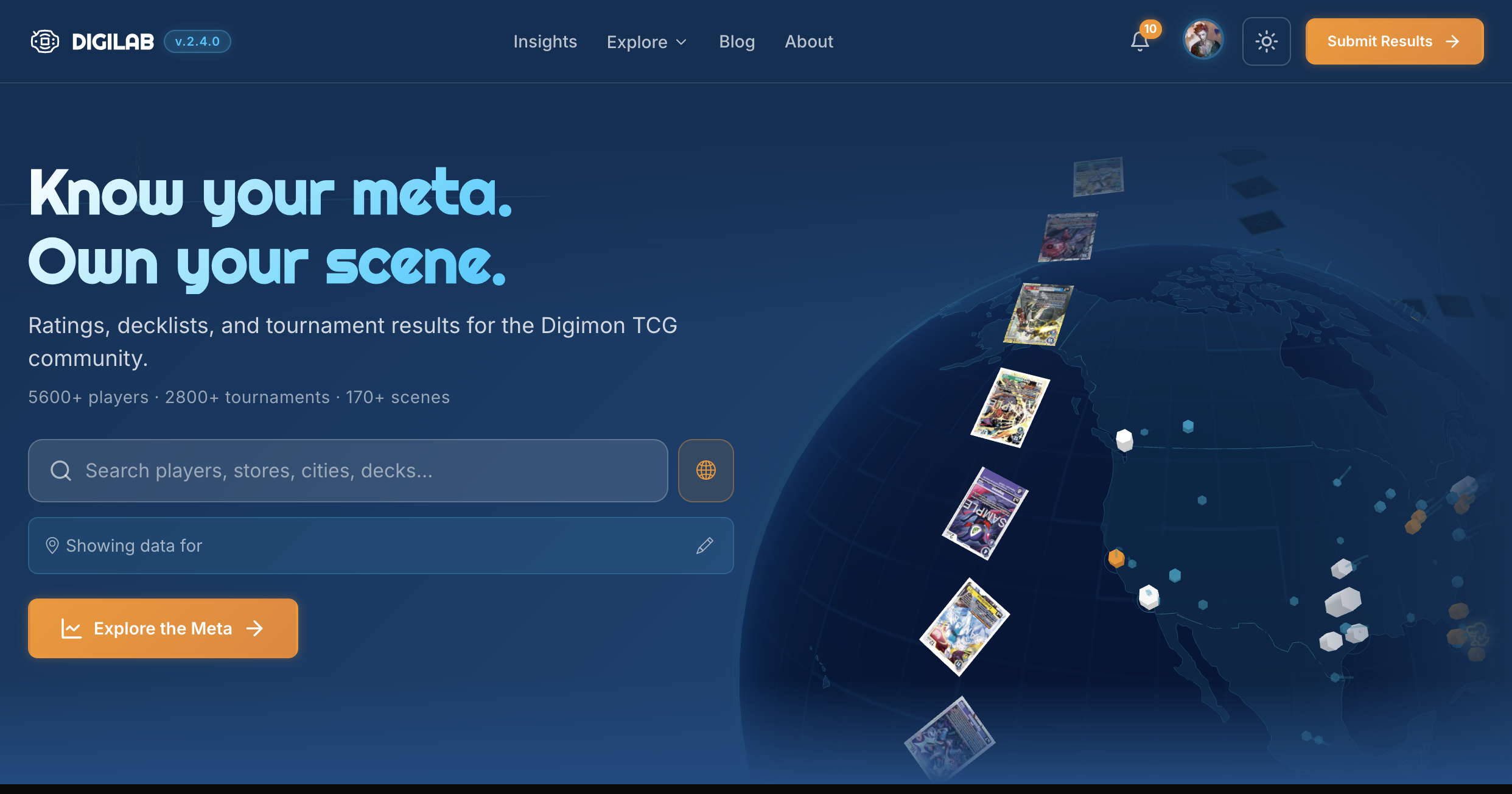
The hero section now features an interactive 3D globe on desktop. Scenes light up based on tournament activity, card art from the current meta floats in orbital rings, and Agumon hops between communities along the surface. Hover any scene to see its name and tournament count. Click one and the site scopes to it, loading that community’s data across the page.
On mobile, the globe is replaced by our Agumon icon. Three.js never loads on smaller screens, so there’s zero performance cost.
Find Yourself

This was requested by a couple of people: make the homepage feel personal.
When you select a scene, DigiLab shows a “Find yourself” prompt with an inline search. Type your name, pick yourself from the results, and the homepage becomes yours: your rating, your scene rank, your win rate, and quick links to your profile. All stored locally, no account required. If your player has a home scene, the site automatically scopes to it.
Your personal strip updates in the background every time you visit, so you’re always seeing fresh stats without waiting for anything to load. Hit “Not you?” to switch anytime. Dismiss the prompt and a small “Personalize” button stays available if you change your mind later.
Featured Spotlight
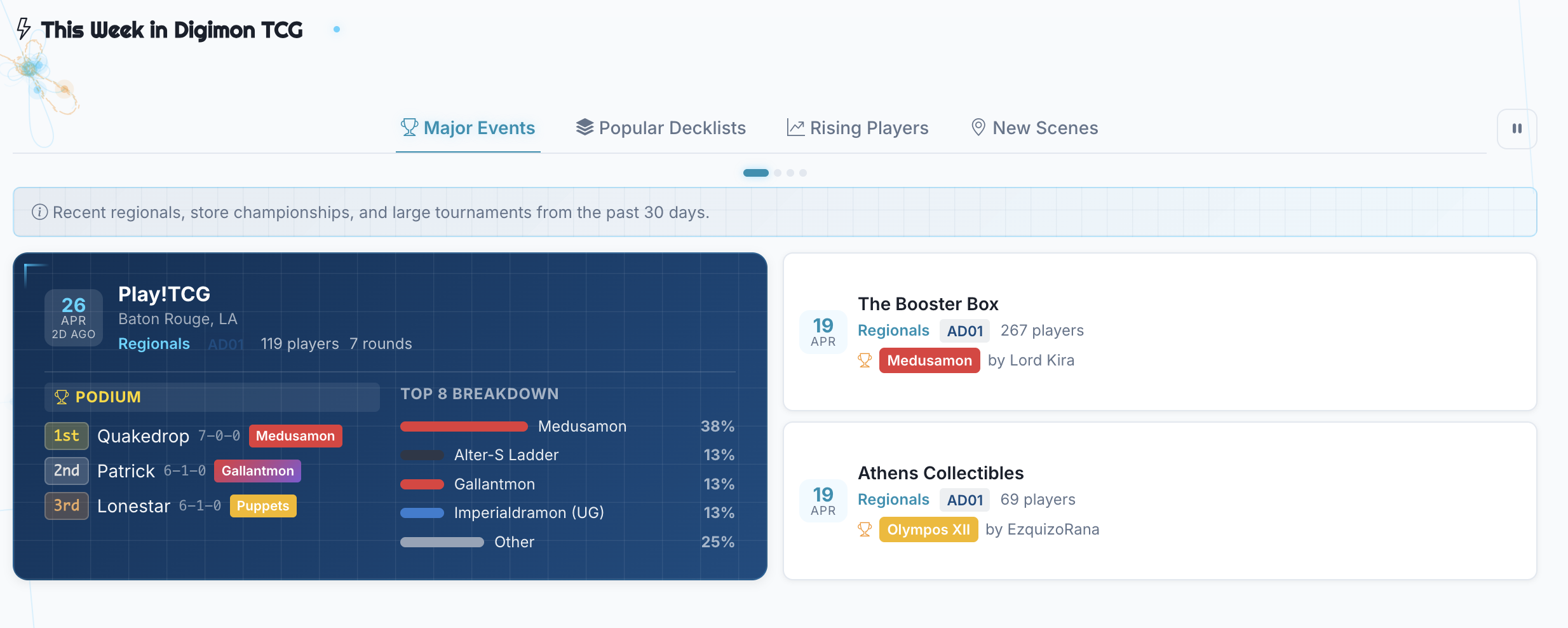
The new “This Week in Digimon TCG” section surfaces what’s happening across DigiLab right now, broken into four tabs:
- Major Events - Recent regionals, store championships, evo cups, and large tournaments. Tiered by importance so regionals always show first. The top event gets a full-width hero card with a top-3 podium and meta snapshot.
- Popular Decklists - The most-viewed decklists from the past week. Every time someone visits a decklist page, it counts. The most popular builds rise to the top.
- Rising Players - Tamers with the biggest rating jumps in the last 30 days. See who’s on a tear and where they’re from. Ratings start at 1500: Elite is 1800+, Strong is 1650+, Good is 1500+.
- New Scenes - Recently created communities that are actively running events. These show the latest scenes across all of DigiLab, so you can discover communities anywhere in the world.
The tabs auto-cycle every 15 seconds, pause when you hover or focus, and show just icons on mobile to save space. There’s also a pause button if you want to stop the cycling and stay on one tab. You can navigate between tabs with arrow keys too. All of it is server-rendered and cached: no loading spinners.
Card Breakdown on Deck Pages
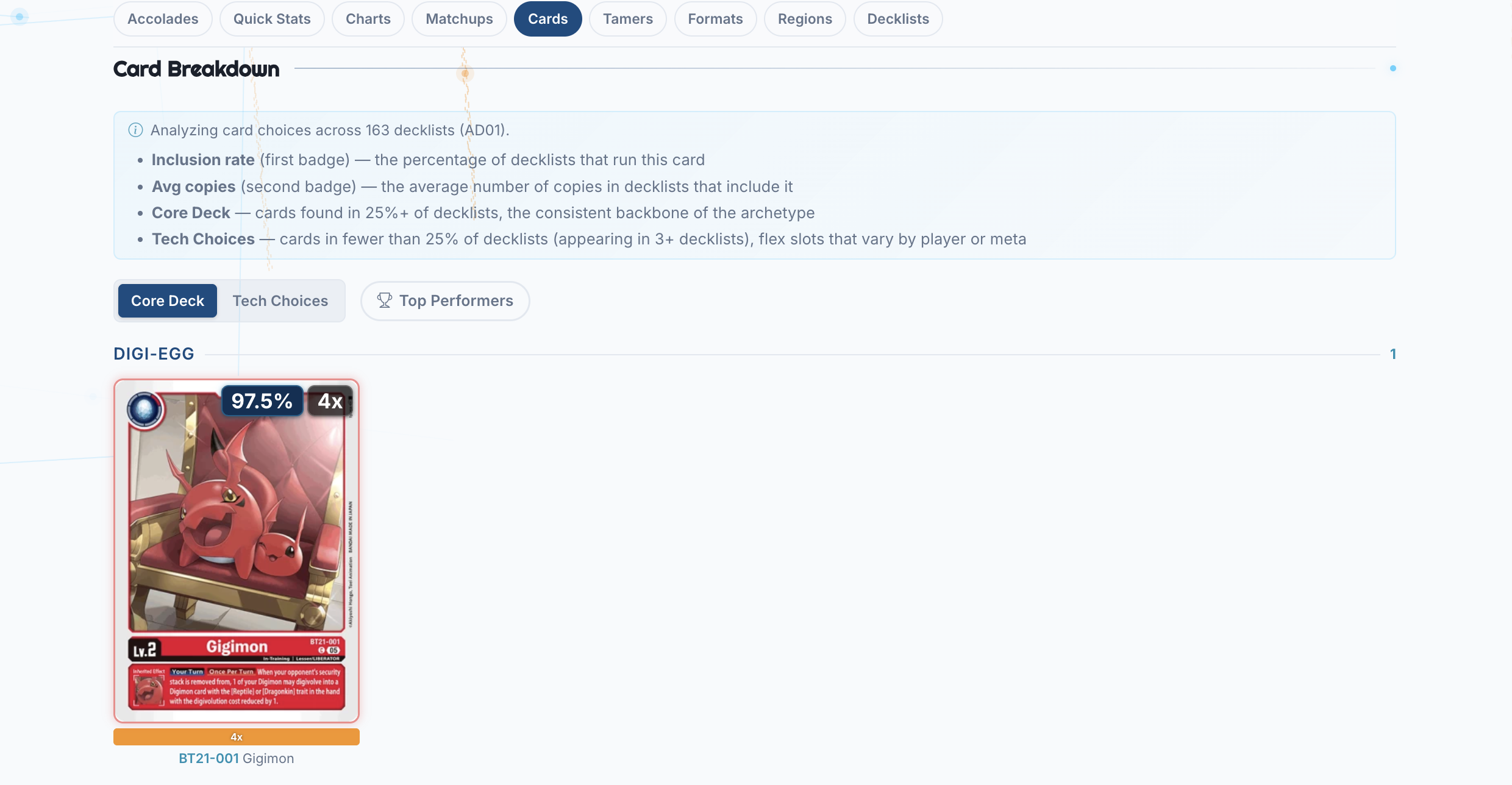
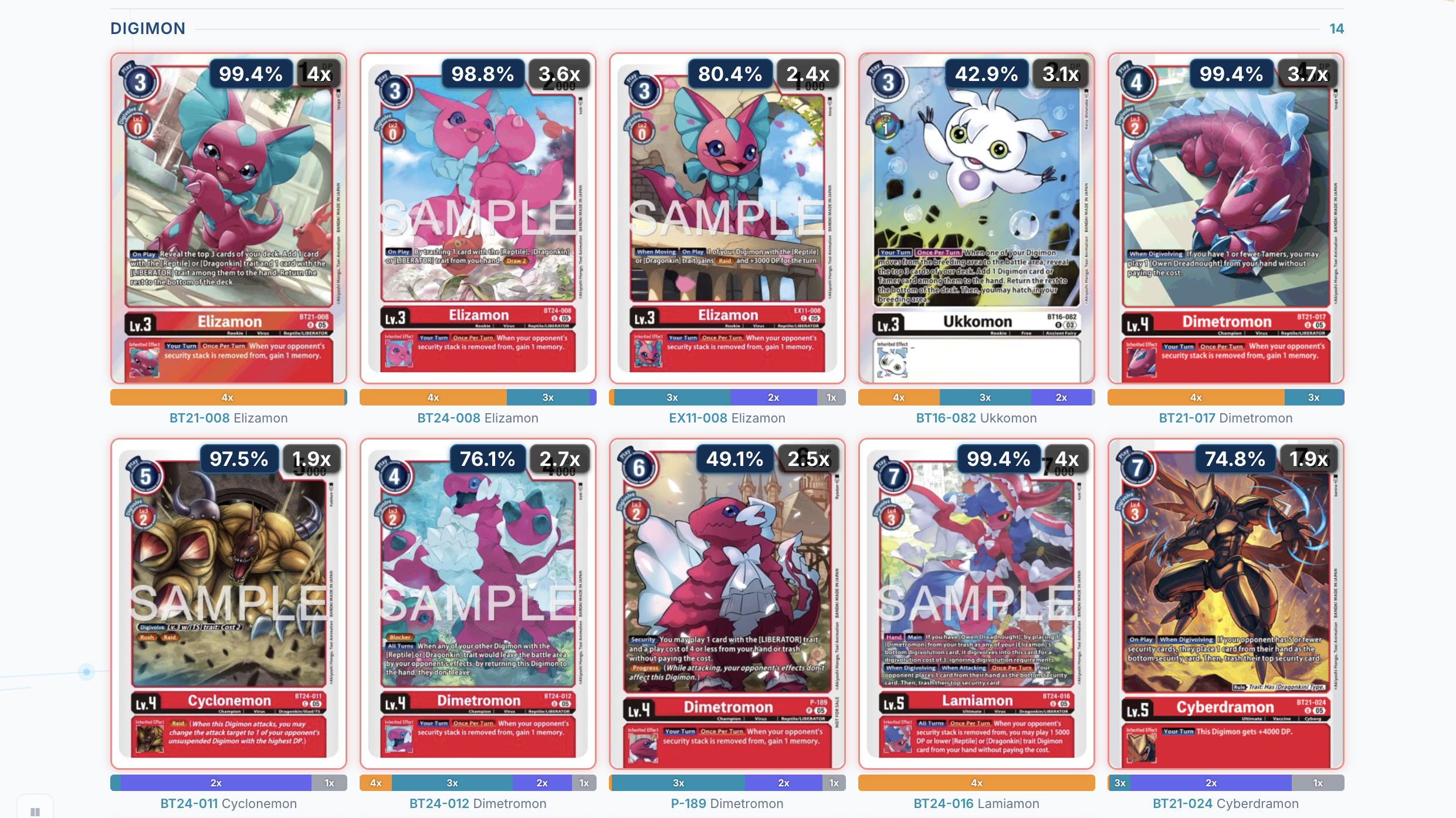
Deck pages now have a full card breakdown section. For every card played in an archetype, you can see:
- Inclusion rate - What percentage of decklists run this card
- Copy distribution - How many copies people play (1, 2, 3, or 4)
- Core vs. Tech - Cards are split into Core (played in most lists) and Tech (flex slots that vary)
You can toggle to show stats from only top-performing decklists (top 25% of placements), and filter tech cards by name.
This was a big community request: people wanted to know not just what decks are winning, but how they’re built.
Card Detail Modal
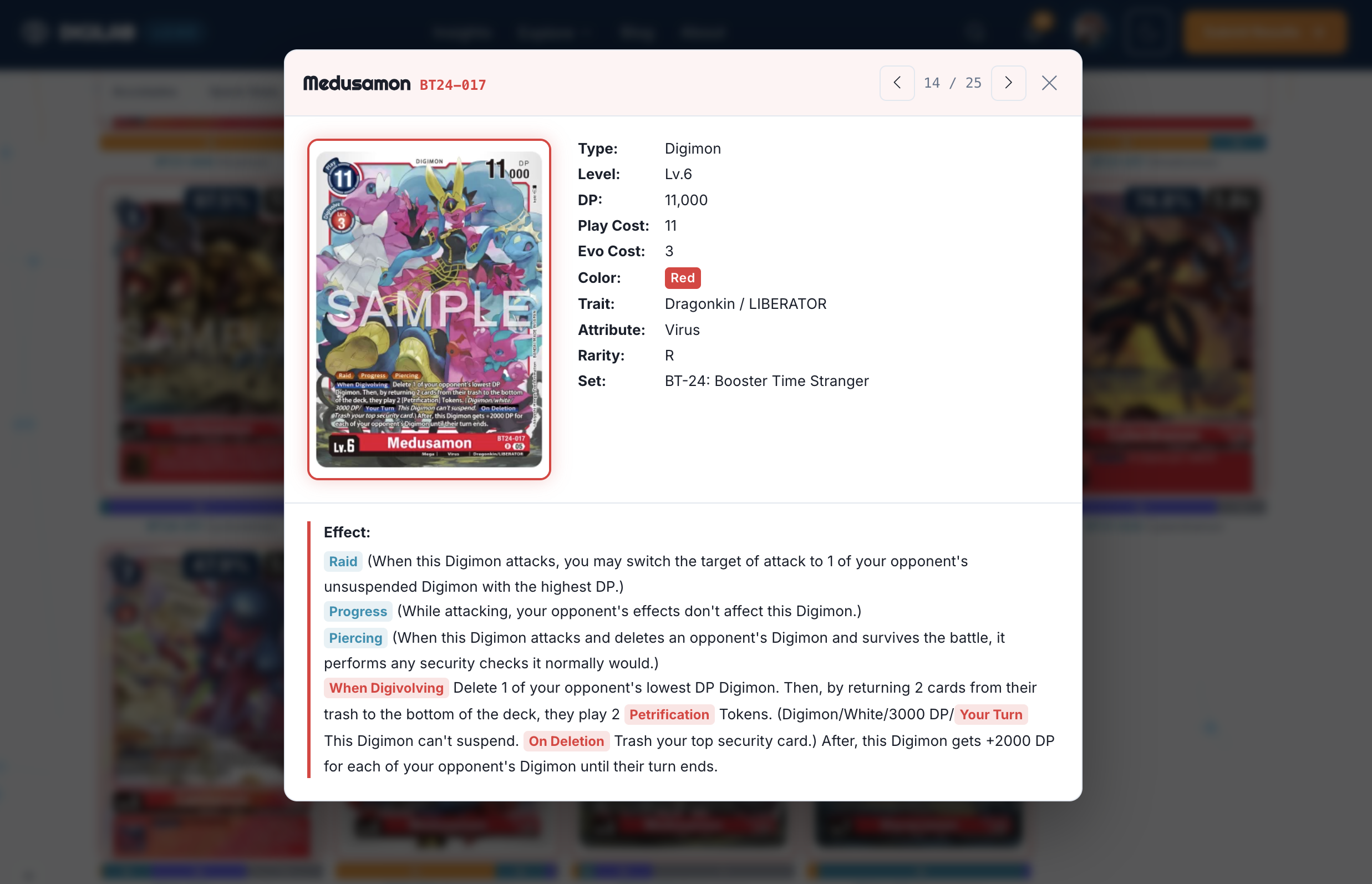
Click any card in a decklist or the deck page card breakdown and a detail modal opens with full card art, the card’s inclusion rate, copy distribution, and which decklists feature it. This works across both decklist pages and deck archetype pages, so you can inspect individual cards in context wherever you encounter them.
Meta Improvements
The meta section got several upgrades:
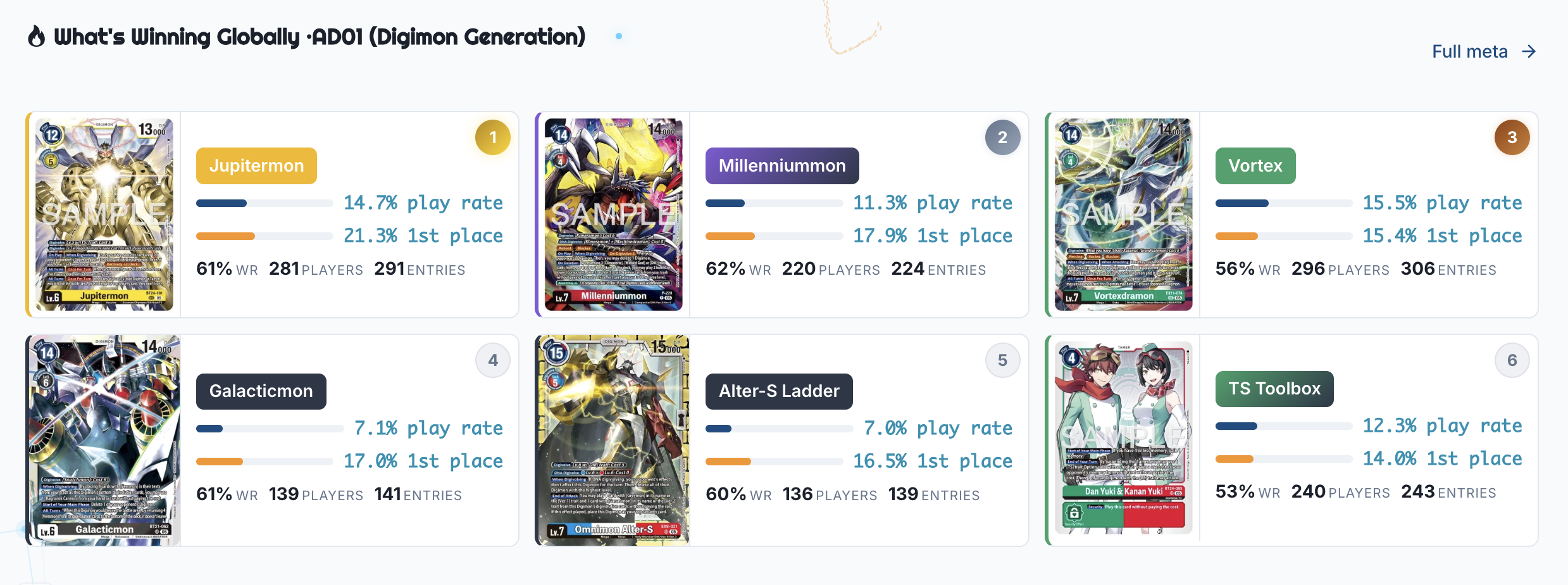
- Two-bar layout - Each deck now shows play rate (blue) and 1st place conversion (orange) as visual bars, making it easy to scan which decks are popular vs. which are actually winning.
- Bayesian win rate sort - Win rates are now adjusted using a Bayesian smoothing formula. A deck’s displayed win rate is a weighted blend of its actual performance and the global average, where the weight depends on how many tournament entries the deck has. If a deck has only played in a handful of events, its win rate pulls heavily toward the average. As the sample size grows, the actual results take over. This means a deck that went 3-0 in two events won’t outrank a deck with a 65% rate across fifty events. You need consistent results over a real sample to top the rankings.
- Format filtering - Meta data is now scoped to the active card format. No more mixing old set results with current ones.
Accessibility and Polish
This release includes a full accessibility pass across the site:
- Tooltips everywhere - Hover any stat label to see what it means. No jargon without explanation.
- Keyboard navigation - Every interactive element is reachable via Tab, operable via Enter/Space, and announced by screen readers.
- Info hints - Contextual notes on tamer, tournament, and leaderboard pages explaining what you’re looking at.
- Rating explainer - Tier thresholds (Elite, Strong, Good, Average) shown on tamer pages with a link to the methodology.
These changes don’t make for flashy screenshots, but they make the platform better for everyone.
Smarter Defaults
Listing pages (Leaderboard, Tournaments, Decklists, Insights, Meta) now default to the most recent card format instead of showing all formats. This means when you land on any page, you’re immediately seeing current-format data without needing to set a filter. Select “All Formats” from the dropdown if you want the full history.
The homepage also has a new sticky jump nav below the hero, so you can quickly hop between Featured, Meta, Tournaments, Players, Community, and Blog sections as you scroll.
Performance
The homepage now server-renders all data sections on first load. When you visit digilab.cards, meta cards, tournament cards, and player cards are already in the HTML: no skeleton loaders, no waiting for API calls. The page is edge-cached for 30 minutes, so most visits are instant.
Scene-scoped data still fetches client-side when you switch scenes, but the initial experience is dramatically faster.
Smarter Match Submissions
The match submission flow got an upgrade as well:
- Match mirroring - When you submit match results, DigiLab now automatically creates the other side of each match. If you report a win against someone, their record gets a corresponding loss, and vice versa. This means one person submitting their results fills in data for every opponent they faced that tournament. Mirror rows never overwrite data that your opponent already submitted themselves.
- Conflict detection - If you submit results and an opponent already submitted conflicting data for the same round (for example, you both claim to have won), the review screen shows a warning. You can choose “Mine is correct” to proceed with your data, or “Use their data” to accept the opponent’s version. No more silent overwrites or mystery discrepancies.
- Garbled PDF support - Some tournament PDFs use scrambled fonts that look fine on screen but extract as garbage text. DigiLab now detects this and automatically renders the PDF pages as images, then runs them through OCR. It takes a bit longer, but it works where text extraction can’t.
These changes should significantly improve the accuracy and coverage of match data across the platform. If you’ve been holding off on submitting because results seemed wrong, give it another try.
What’s Next
Here’s a chunk of upcoming features I’m planning:
- TCGPlayer card linking - Cards in decklists and the meta card breakdown will link directly to TCGPlayer, so you can check prices and buy singles without leaving the page.
- Search results page - A dedicated
/searchpage with full results across players, stores, scenes, and decks. Shareable URLs so you can link someone directly to a search. - Discovery recommendations - “Similar Decks” and “Popular in Your Scene” sections on deck and tamer pages to help you explore.
Built by the Community
None of this works without the people submitting data. Every decklist upload, every match result, every tournament report powers card breakdowns, meta stats, win rates, all of it. If you’ve been submitting through the app, thank you. With your help we have been able to build advanced features like these!
A lot of what’s in 2.4.0 came from community requests too. The identity system, the card breakdown, the featured section, the tooltips were all things people asked for on Discord, in DMs, and through the feedback form. Keep it coming. The best way to shape DigiLab is to use it and tell us what’s missing.
If your scene isn’t on DigiLab yet, join the Discord and we’ll get you set up. If you’re already here, thanks for being part of this.
DigiLab is a free, community-driven project. If you want to help keep it running, consider supporting on Ko-fi. Every bit helps cover server costs and development time.
Share your profile, check the featured section, and let us know what you think.